
Waves, impact ripples, and wakes
Ambient waves
Use Waves to set the continuous movement of the waterline.
| Setting | Meaning |
|---|---|
| Mode | Sine gives regular waves; Organic gives less repetitive layered motion. |
| Direction | Travel direction across the water surface. |
| Wave Amplitude | Vertical wave displacement; 0 produces a flat ambient waterline. |
| Wave Speed | Rate of wave phase movement. |
| Wave Frequency | Spatial frequency; larger values put crests closer together. |
Small amplitude and low frequency give broad, gentle motion. Higher amplitude increases vertical movement; higher frequency produces tighter waves. Ambient wave settings are separate from an object’s impact strength.
Impact ripples
Impact ripples are one-shot waves created when an eligible moving object enters, exits, or strikes the waterline. They have three related outputs that can be tuned independently:
- Mesh Deformation changes the rendered water shape and enables the Physics controls.
- Visual Effects enables the splash spike, ripple normals/color, and foam rings.
- CPU sampling can let buoyancy or a controller feel nearby ripples, subject to the shared physics-sample budget.
Turning off Mesh Deformation can keep visual-only foam. Turning off Visual Effects can keep physical deformation without the splash and foam treatment. Turning both off disables impact-ripple output.
Physical ripple movement
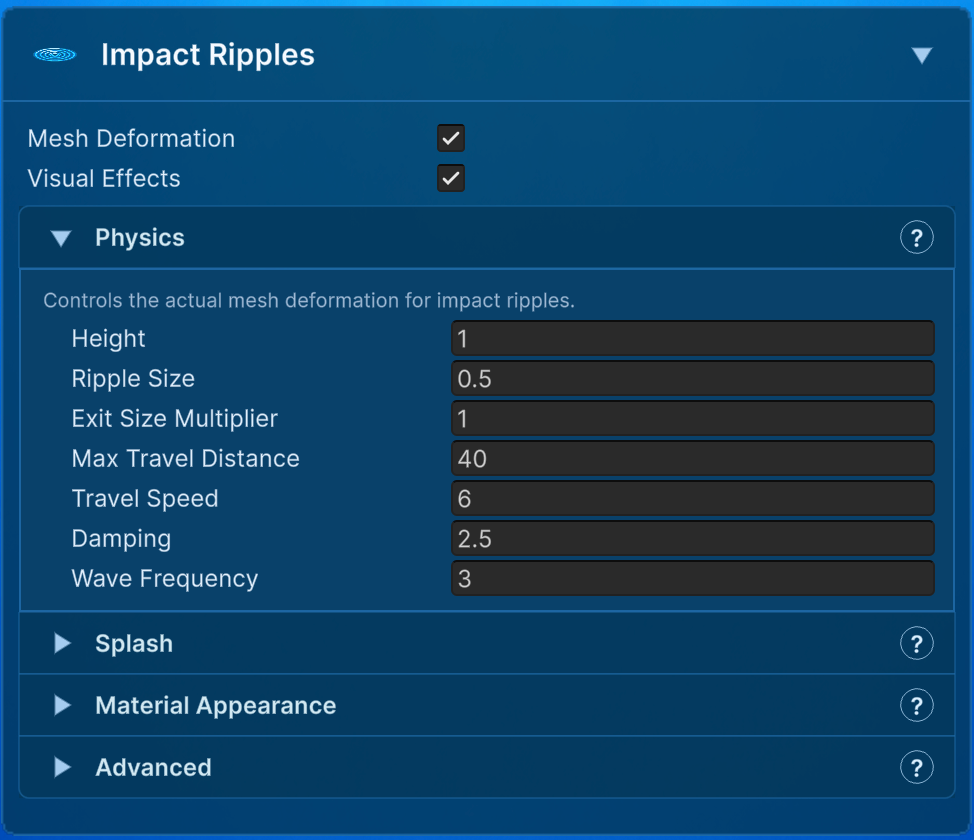
| Parameter | What it does |
|---|---|
| Height | Default deformation-height multiplier for objects without a per-object amplitude override. |
| Ripple Size | Width of the central impact footprint. It does not determine how far the ring travels. |
| Exit Size Multiplier | Scales exit-ripple size relative to entry size. 1 keeps them equal. |
| Max Travel Distance | Maximum radius reached before the ripple disappears. Larger distances also keep active ripples relevant over a larger area. |
| Travel Speed | World-space speed of the outward wavefront. It does not change spawn frequency. |
| Damping | Rate at which strength decays. Higher damping shortens the visible and physical lifetime. |
| Wave Frequency | Oscillation inside the ripple. Higher values produce tighter repeated rings; lower values produce a broader wave. |
Ripple Size, Max Travel Distance, and Wave Frequency describe different parts of the shape. Use Ripple Size for the impact footprint, Max Travel Distance for reach, and Wave Frequency for how tightly the rings repeat.
Splash and speed mapping
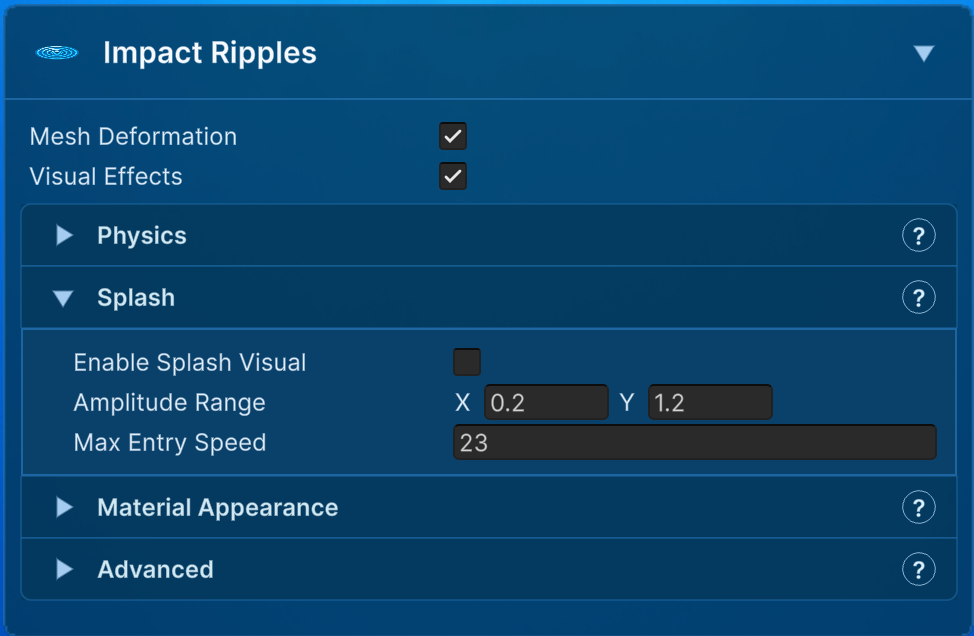
Enable Splash Visual adds the central vertical blob/spike at the impact location. Splash Height scales that spike relative to amplitude. Amplitude Range maps entry speed to minimum and maximum ripple strength, and Max Entry Speed is the speed at which the maximum is reached. Speeds above it are clamped for this mapping.
This means a slow entry uses the low end of Amplitude Range and a fast entry approaches the high end. Change the range to alter physical/visual strength; change Splash Height to alter the central spike without changing the traveling ring. A WaterRippleOverride can replace these defaults for one object.
Ripple material and foam
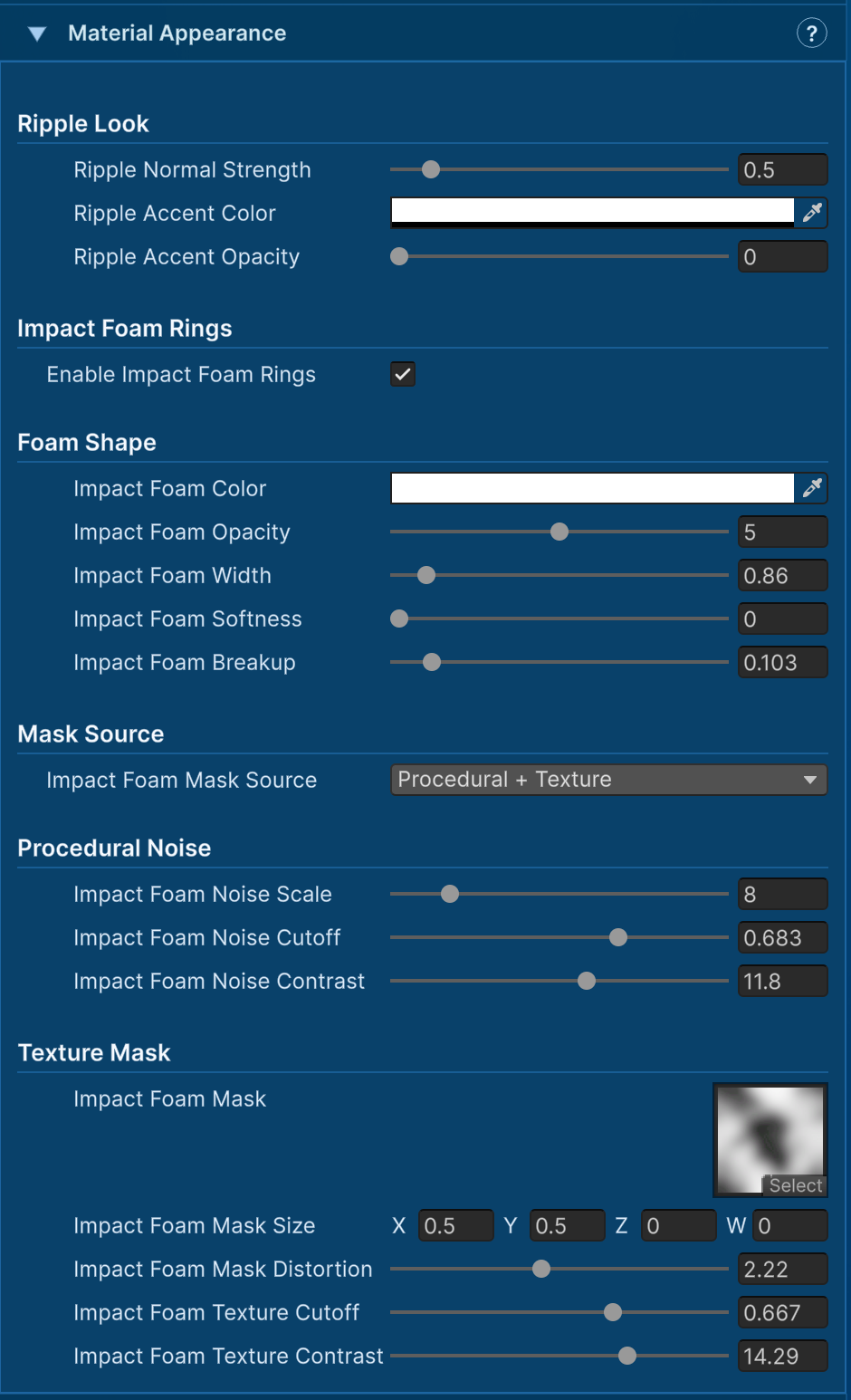
| Group | Important controls |
|---|---|
| Ripple Look | Ripple Normal Strength changes lighting detail. Ripple Accent Color and Opacity tint the moving crest without changing deformation. |
| Foam Shape | Color, Opacity, and Width establish the band. Softness fades its edges and Breakup fragments a clean ring. |
| Mask Source | Select procedural noise, a radial texture, or both. This changes only the foam mask. |
| Procedural Noise | Scale controls pattern size, Cutoff changes coverage, and Contrast sharpens the transition around the cutoff. |
| Texture Mask | Assign a radial mask. Size changes detail scale, Distortion bends it, Cutoff removes darker values, and Contrast sharpens the remaining mask. |
The foam follows the physical ripple wavefront, but it is material shading. Increasing foam opacity does not increase buoyancy, sampled ripple force, or mesh height.
Filtering, limits, and shallow water
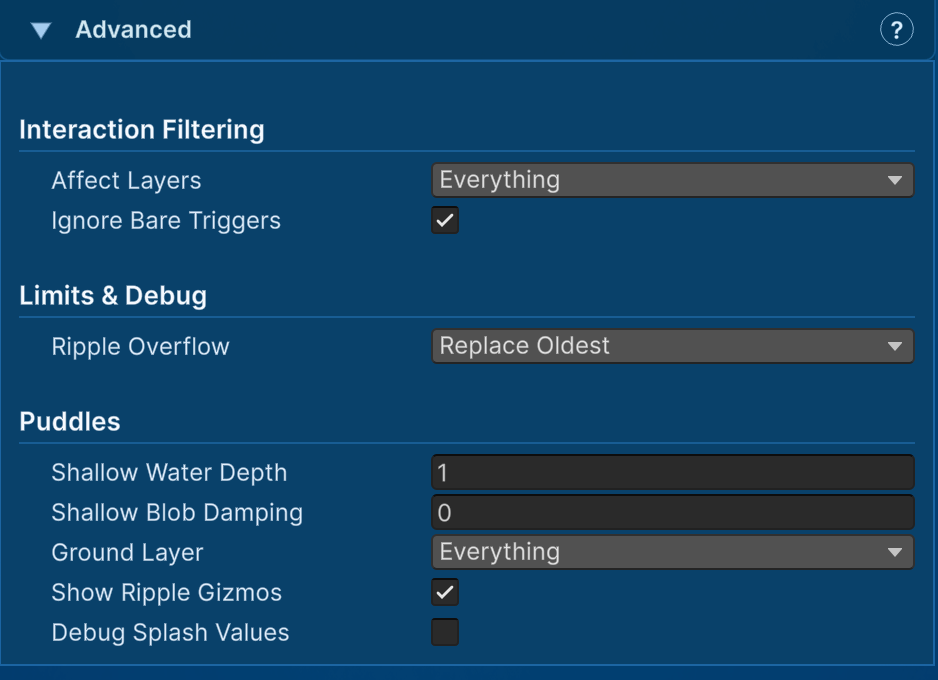
| Parameter | What it does |
|---|---|
| Affect Layers | Only objects on these GameObject layers may create ripples and wakes. Keep the mask narrow in busy scenes. |
| Ignore Bare Triggers | Ignores trigger colliders that have neither Rigidbody2D nor MotionTracker2D. Transform-driven objects need MotionTracker2D to report velocity. |
| Ripple Overflow | Chooses whether the 64-ripple capacity replaces the oldest, replaces the weakest, or ignores the new ripple. |
| Shallow Water Depth | Starts reducing ripple amplitude when configured ground is detected within this distance below the surface. |
| Shallow Blob Damping | Adds damping only to the central splash blob over shallow ground. It can make puddle splashes smaller without removing the traveling ring. |
| Ground Layer | Layers used by shallow-depth detection. |
| Show Ripple Gizmos / Debug Splash Values | Scene and Console diagnostics. Disable verbose diagnostics outside investigation. |
An object needs suitable motion information. Use a Rigidbody2D or add Motion Tracker 2D for transform-driven movement. A bare trigger collider does not provide the velocity needed to map impact strength.
Wakes
Wakes are a stream of smaller ripple instances generated while eligible objects move near the waterline. They share the ripple system and material, but have their own spawn, travel, foam, and capacity controls.
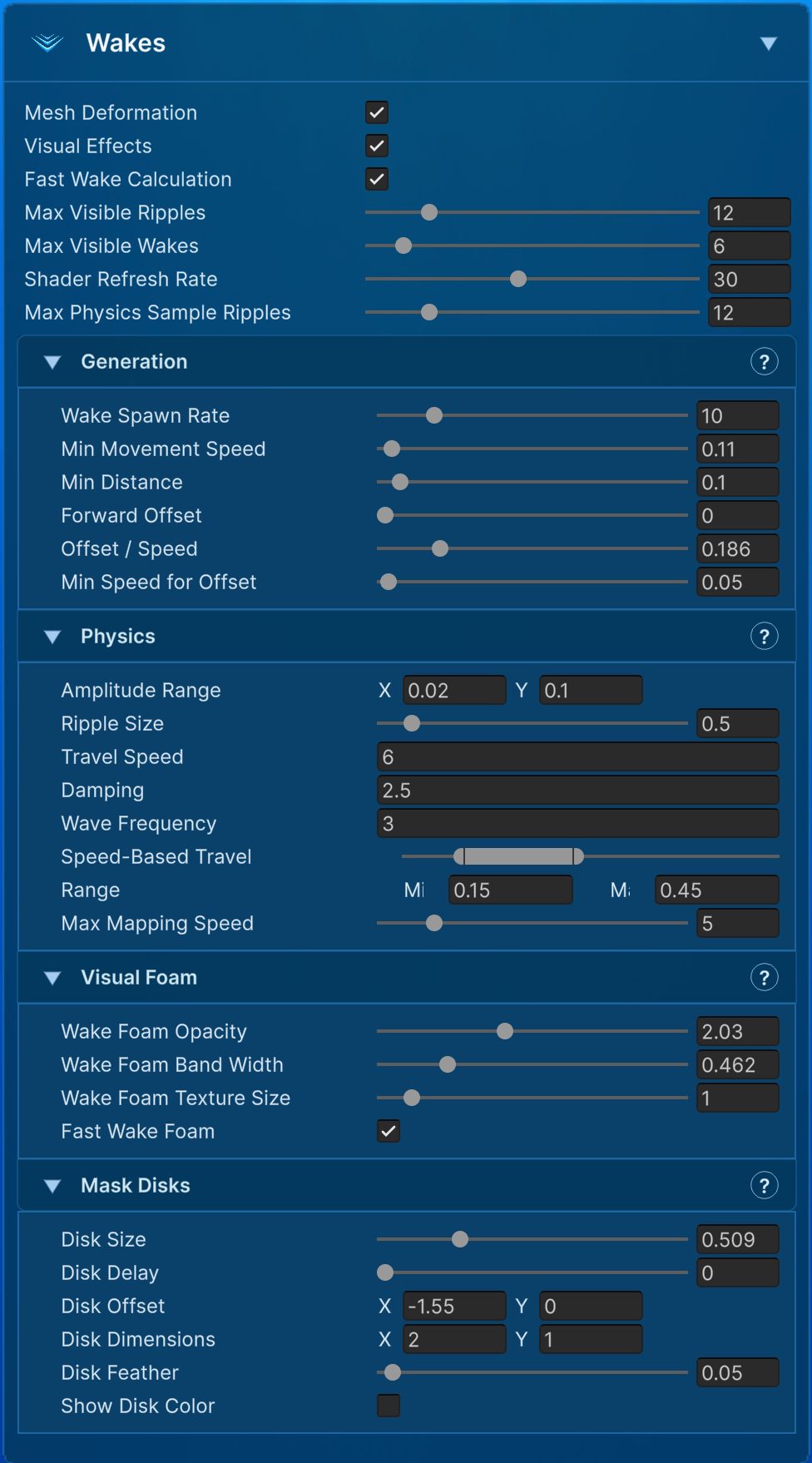
At the top of the section:
| Setting | Meaning |
|---|---|
| Mesh Deformation | Allows wakes to move the rendered mesh. Turn it off for foam-only trails. |
| Visual Effects | Allows wake foam and mask-disk visuals. It does not enable physical deformation by itself. |
| Fast Wake Calculation | Uses a cheaper smooth-ring shader path. Disable it only when the full oscillating ripple shape is visually necessary. |
| Max Visible Ripples | Total shader budget shared by impact ripples and wakes. The strongest active instances are kept. |
| Max Visible Wakes | Wake-only allowance inside the shared visible budget. Lower this first when moving objects produce too many rings. |
| Shader Refresh Rate | Frequency at which C# reselects active ripples and uploads their data. Shader animation still advances every frame; a lower rate reduces CPU/render-thread uploads rather than slowing wave travel. |
| Max Physics Sample Ripples | Maximum nearby active ripples considered by CPU water-height and force queries. Lower values reduce buoyancy/controller sampling work in wake-heavy scenes. |
Wake generation
| Setting | Meaning |
|---|---|
| Wake Spawn Rate | Maximum wake spawns per second per object. 0 disables spawning. |
| Min Movement Speed | Ignores slow drift and small idle motion. |
| Min Distance | Minimum world-space travel before another wake can spawn. It works with Spawn Rate to prevent dense overlaps. |
| Forward Offset | Base distance ahead of the object along its movement direction. |
| Offset / Speed | Additional forward offset for each unit of movement speed. |
| Min Speed for Offset | Below this speed, wakes stay at the contact point so noisy direction changes do not flip the offset. |
Spawn Rate is a time limit and Min Distance is a travel limit; both must allow a new wake. Raise Min Distance to space rings farther apart even when the spawn rate is high.
Wake physics and speed mapping
| Setting | Meaning |
|---|---|
| Amplitude Range | Maps slow movement to the minimum strength and movement at Max Mapping Speed to the maximum. |
| Ripple Size | Width of each wake waveform. |
| Travel Speed | Outward wavefront speed in world units per second. |
| Damping | How quickly the wake loses strength. Higher values shorten its lifetime. |
| Wave Frequency | Internal oscillation; higher values create tighter rings. |
| Speed-Based Travel | Minimum and maximum travel distance as fractions of the impact-ripple Max Travel Distance. |
| Max Mapping Speed | Movement speed where both amplitude and speed-based travel reach their maximum values. Faster motion is clamped for mapping. |
Wake movement speed therefore influences amplitude and travel through Max Mapping Speed, while Travel Speed controls how fast a spawned ring expands. They are separate controls.
Wake foam and mask disks
| Setting | Meaning |
|---|---|
| Wake Foam Opacity | Wake-only foam intensity. Impact foam keeps its regular opacity. |
| Wake Foam Band Width | Scales wake foam width without changing the physical waveform or impact foam. |
| Fast Wake Foam | Uses a cheaper smooth mask and skips the detailed wake texture controls below. Disable it to display texture detail. |
| Wake Foam Texture | Optional texture used only by wakes. When empty, wakes reuse the Impact Ripple Foam texture. |
| Wake Texture Size | Controls the world-space size of wake texture features. Larger values make features larger; smaller values repeat them more often. |
| Wake Texture Scroll Speed | Scrolls the detailed wake texture in X and Y. |
| Wake Texture Distortion | Applies procedural warping only to the detailed wake texture. |
| Wake Texture Cutoff / Contrast | Sets the brightness threshold and sharpness of the detailed wake foam mask. |
| Disk Size | Mask radius as a fraction of the current wake wavefront. 1 matches its full radius. |
| Disk Delay | Distance subtracted before mask radius is calculated, making the cutout lag behind the foam. |
| Disk Offset | Local offset; X follows movement direction and Y moves sideways. |
| Disk Dimensions | Ellipse scale along and across movement. 1,1 is circular. |
| Disk Feather | Softness at the disk-mask edge. |
| Show Disk Color | Debug overlay only. Turning it off keeps the disk’s masking effect. |
The detailed radial sampler blends across its polar-coordinate boundary to hide the spoke-like seam that can otherwise appear even with a tileable image. Import custom foam textures with Wrap Mode: Repeat so their ordinary U/V boundaries tile as well.
For a subtle swimmer trail, reduce amplitude and foam opacity, increase Min Distance, and keep Spawn Rate modest. For boats or fast characters, add some forward offset and use speed mapping so fast motion produces a longer, stronger trail.
For performance, lower Max Visible Wakes first, then reduce Wake Spawn Rate or increase Min Distance. Enable Fast Wake Calculation and Fast Wake Foam. Reduce Shader Refresh Rate if uploads are expensive and Max Physics Sample Ripples if buoyancy or controller sampling is expensive. If runtime ripple patch smoothing is active, also reduce Max Runtime Patch Zones or its refresh rate so a wake stream does not continuously rebuild geometry.
Per-object ripple overrides
Add Water Ripple Override (WaterRippleOverride) to an interacting object to make its entry, exit, and wake different from the water’s defaults. Each amplitude/radius override must be enabled before its value applies.
Use a stronger splash for a heavy crate and a smaller wake for a lightweight swimmer. Override Splash Blob controls the central visual independently of the ripple ring. Disabling the blob can keep the ring while removing the spike. Enable Use Exit Overrides when exiting needs separate settings; otherwise exit uses the splash overrides.